Incident
REPORT INCIDENT
Objective : To report occurrence of any incident within the Plant during day-to-day activity. It allows user to report, review and approve/reject incident using the system.
Below steps to be followed to complete a incident report :
- REPORT INCIDENT : To create/report new incident. Any employee working on the GA, who has access to the system (Power user OR Public user) can report an incident.
- REVIEW INCIDENT : Review Initial Incident Report review task.
- If initial reporting done by any system user then respective HSSE manager and GA head shall receive the Initial Incident Report review task. Either one of them shall take up the review task.
- Reviewer can perform three actions under review such that
- Send for Investigation
- Approve and assign action item
- Void and Close.
- IDENTIFY INVESTIGATION TEAM MEMBER : Identify investigation Team member by HSSE Manager or GA Head. Any user can be selected as Investigation Team member.
- INCIDENT INVESTIGATION : Investigation will be conducted by any user who is selected under investigation Team member. Once the investigation completed investigation team leader can send for investigation review to GA head or Corporate HSSE head.
- Investigation team leader can perform two actions
- Completed Investigation & Send for GA Head / Corporate HSSE Head
- In Progress.
- Investigation team leader can perform two actions
- REVIEW INCIDENT INVESTIGATION BY CORPORATE HSSE HEAD / GA HEAD : GA Head / Corporate HSSE Head reviews the investigation report and can perform two actions
- Approve Investigation.
- It approves the investigation report and assigns action item (CAPA) to respective responsible person.
- Send back for correction of incident investigation
- It send the investigation report back to investigation team leader to make corrections or fill the insufficient data.
- Approve Investigation.
Note :
- Any of the user from the HSSE Manager / GA Head roles can review the Initial incident Report
- Any of the user from the Corporate HSSE Head / GA Head roles can review the Initial incident investigation Report
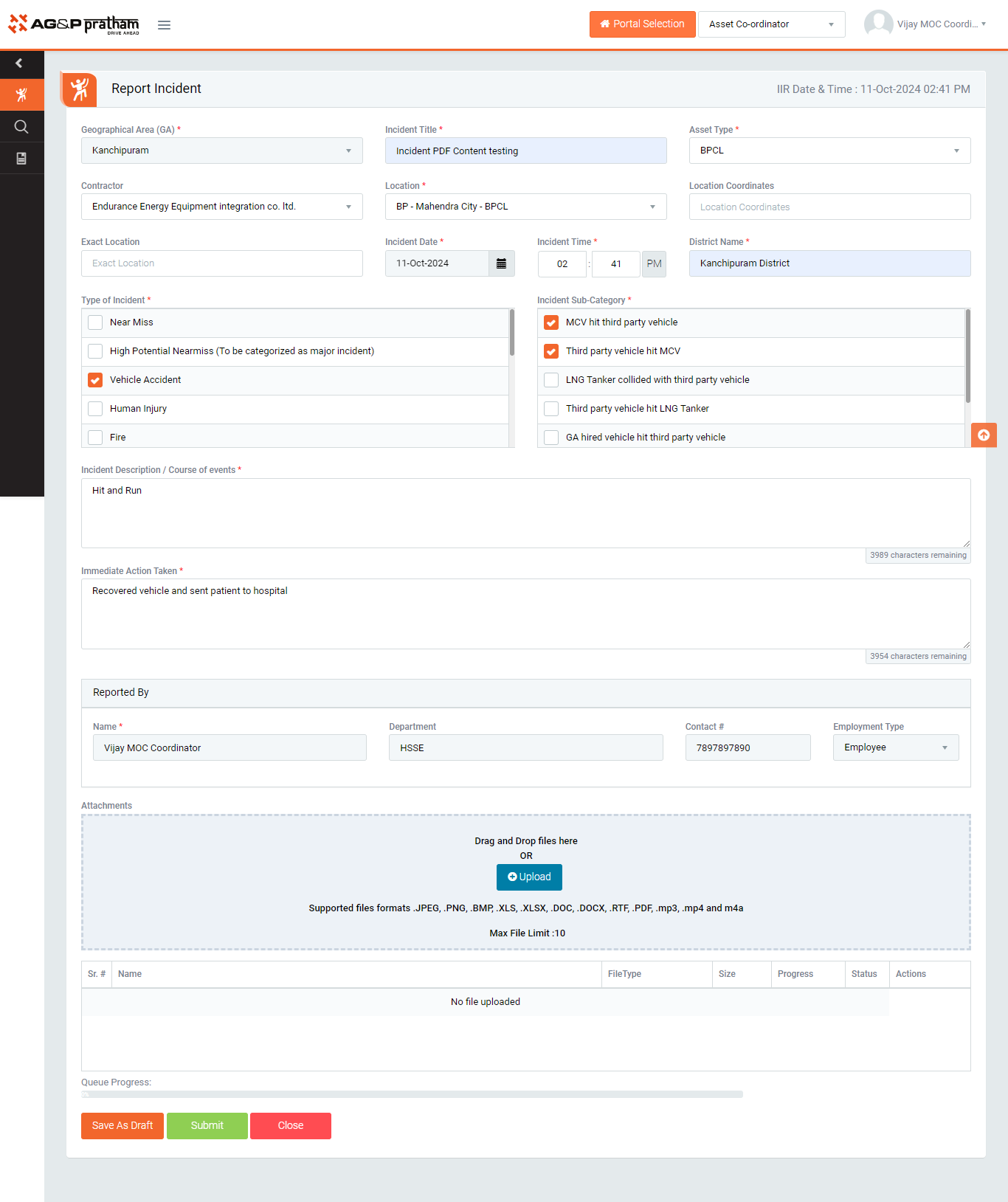
Figure 1
- Navigate to Incident Menu | Report Incident Sub menu to open Incident screen.
- Enter the GA, Incident title,Asset type, Location in auto complete text box. (Plant, Function/ Sub-Function, Agency/ Sub-Agency, Location/ Sub-Location will be displayed automatically when first 3 characters are typed)
- Provide incident type and corresponding incident sub category along with incident description and what are the immediate actions taken upon incident took place.
- Click on “Save as draft” if initial report is pending to fill to submit later.
- Click “Submit” button to save the data and send for review to GA Head / HSSE Manager”
Note :
- Incident can be reported by any employee working in GA.
- The fields marked with * are mandatory to be filled.
- Employee must select “GA” from drop down list if the employee Is not belongs to any GA.
- Automatic notification alert will be triggered once incident is reported.