Meeting
Schedule Meeting
Objective : It allows user to schedule meeting in any GA in the system.
Below steps to be followed to complete a Asset Observation report :
- Schedule Meeting : To create new schedule meeting shall be done and reported by any system users.
- Conduct Meeting : Reported person who scheduled the meeting can conduct the meeting and update the status of the meeting
Note :
- Any of the power user can report or schedule meeting.
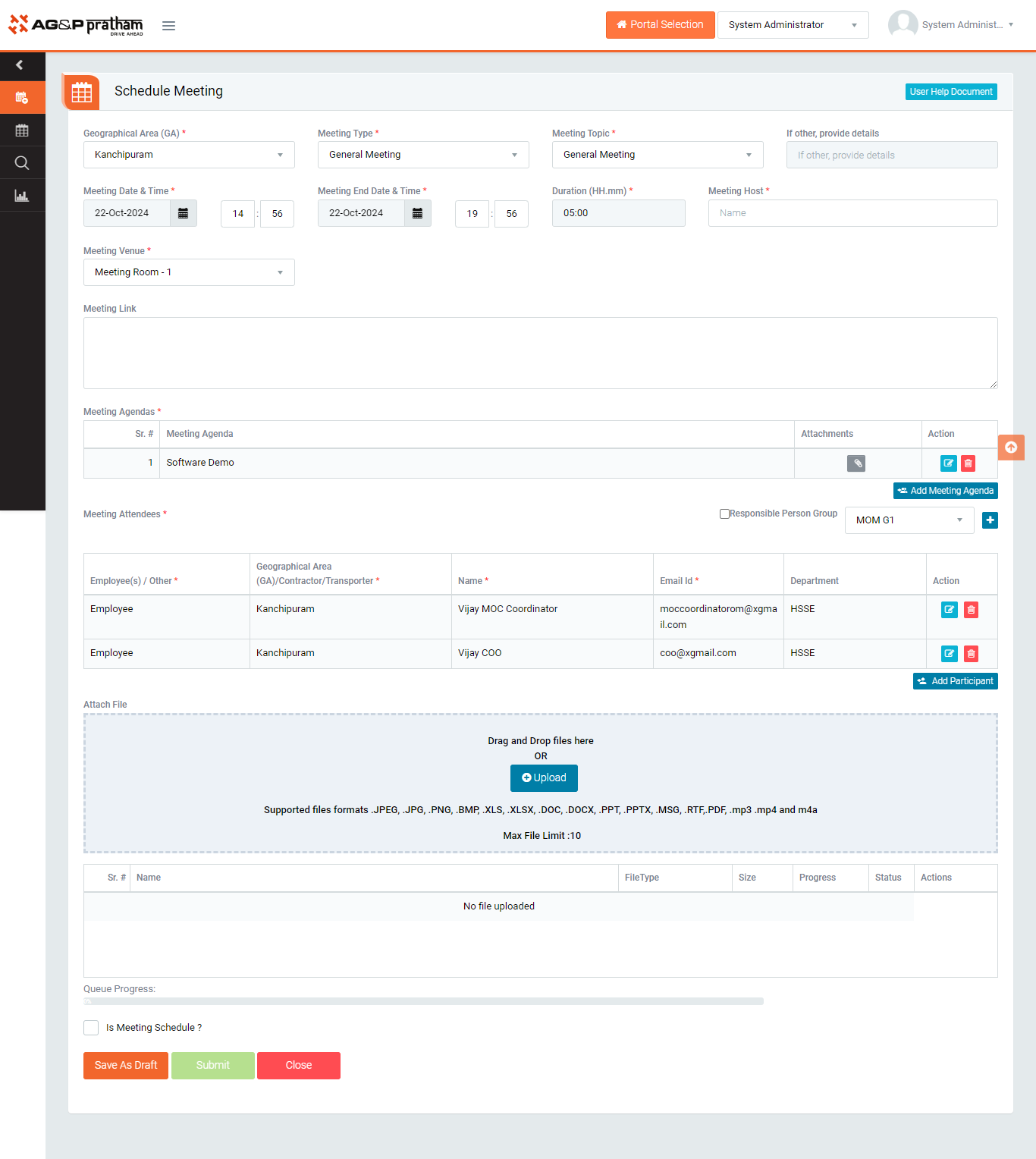
Figure 1
- Navigate to EHS portal | Meeting | Schedule Meeting screen. (Image 1)
- Select GA, Meeting type,Meeting topic,meeting date and time, duration and venue.
- Provide necessary details regarding meeting.
- Meeting Host
- Select the name of the host must be a system user
- Meeting Agenda
- Purpose of meeting
- Meeting attendees
- Who is expected to attend the meeting
- Meeting Host
- Click on is schedule meeting and “Submit” button to save the data to conduct meeting at scheduled time.
Note :
- The fields marked with * are mandatory to be filled.
- Observation shall be reported by any system users.