Incident
REVIEW INCIDENT

Figure 1
- Login as HSSE Manager / GA Head and go to EHS Portal || My Action screen (Image 1)
- There are four section provided to view and take action against tasks which are mentioned below :
- PENDING ACTIONS : Display “Incident/Near Miss”, “EHS Observation”, “EHS Inspection”, “Equipment Inspection” and action items which needs to be performed. Also display the tasks which are saved as draft are displayed here. User will update final information and submit it for further action.(Display by default)
- REVIEW ACTIONS : Display the tasks such as “Incident/Near Miss”, “EHS Observation”, “EHS Inspection” and “Equipment Inspection” including action items which needs to be reviewed. The tasks will be displayed to reviewer for review where reviewer will take action against it.
- INFORMATION ACTIONS : Display all the tasks such as “Incident/Near Miss”, “EHS Observation”, “EHS Inspection” and “Equipment Inspection” to creator/requester with their current status. User can view the task details by clicking subject in “Subject” column.
- When subject of “Incident” in “REVIEW ACTIONS” section is clicked “Report Incident” screen will be opened in different tab.(Image 2)
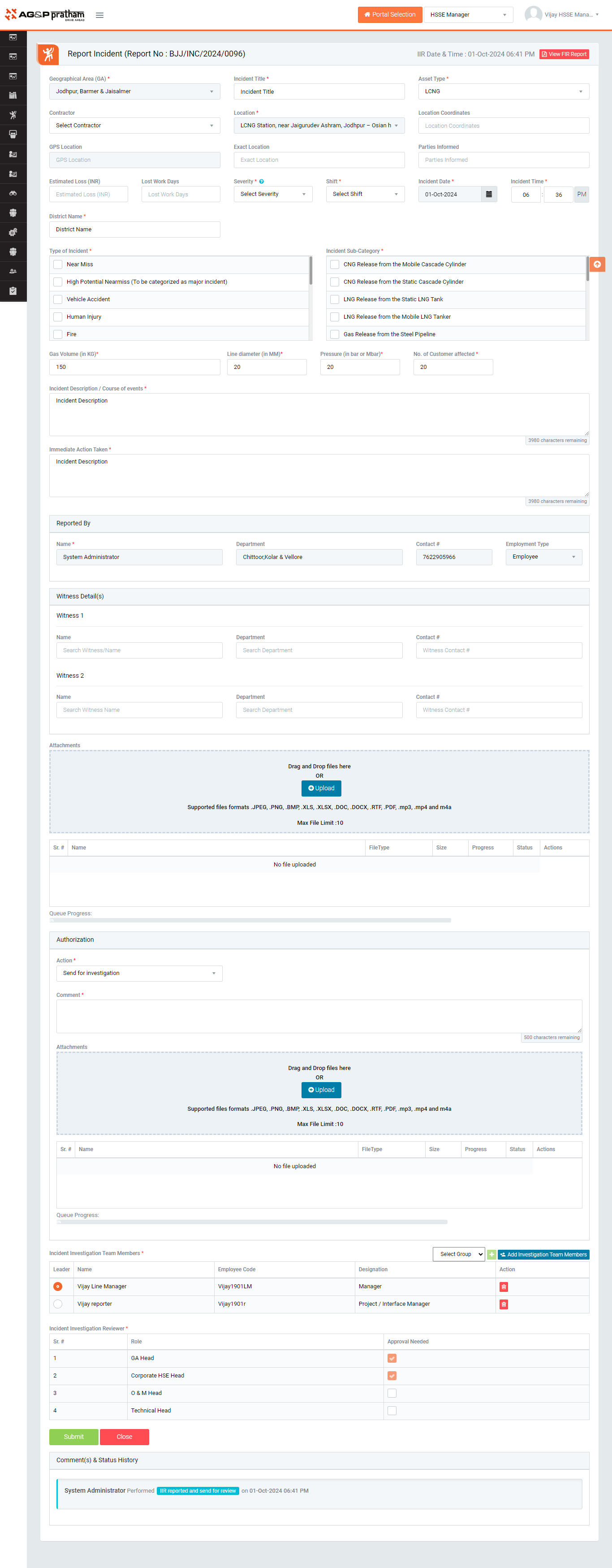
Figure 2
- To take action against a particular incident report select Action from drop down list as below :
- SEND FOR INVESTIGATION : Send the incident report for further review to HSSE Manager / GA Head.
- Creation of investigation team and select team leader

Figure 3
- Creation of investigation team and select team leader
- APPROVE AND ASSIGNED ACTION ITEM : Approve the initial incident report without investigation and assign action item to respective responsible person.
- VOID & CLOSE : To remove the incident report which is invalid, duplicate, no longer need etc. Comment need to be enter in this case. No further action can be taken on discarded reports. Such discarded reports shall be archived and made available to view from the Search page.
- SEND FOR INVESTIGATION : Send the incident report for further review to HSSE Manager / GA Head.
- Click Submit button to save the details and send the incident report for investigation to Plant EHS Head / Plant EHS Manager / Plant EHS Team / OHC User for further review. Any one of them shall take up the review task.
Note :
- Reviewer can not edit the report contents.
- The fields marked with * are mandatory to be filled.