MOC
MOC NON PRE ASSESSED
Raise MOC Request By Any System User
Objective : It allows user to raise management of change using the system.
Types of MOC Categories
- Category A - Operational Changes
- Pre-assessed (GA level user)
- Non Pre-assessed (GA / Department level user)
- Category B - Non Operational Changes (Department level user)
Configurations - Reviewer Roles - User master
- Need to define the system user with below roles for different committee members
- Line manager Reviewer - Line manager role
- GA Head Reviewer - GA Head role
- MOC Coordinate Reviewer - MOC Coordinate role
- MOC Committee Reviewers - MOC Review Committee role
- Regional Head Reviewer - Regional Head role
- HO Committee Reviewers - HO Review Committee role
- COO Reviewer - COO role
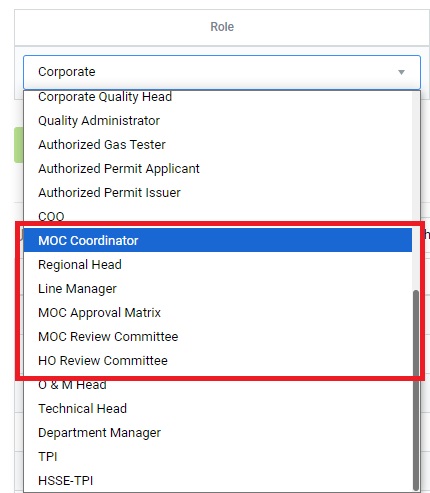
Figure 1
Below steps to be followed to complete Category A - Non Pre-assessed MOC:
- Request MOC :To request/raise new MOC. Any employee(GA level user) working on the GA, who has access to the system can raise a MOC.
- Review MOC by Line Manager :To review the raised MOC by Line Manager. The reviewer may approve the request or send back for Modifications.
- Review MOC by GA Head :To review the raised MOC by GA Head. The reviewer may approve the request or send back for Modifications.
- Review MOC by MOC Coordinator:To review the raised MOC by MOC Coordinator. The reviewer may approve the request or send back for Modifications.
- Review MOC by MOC Committee Review:To review the raised MOC by MOC committee team . The reviewers may approve the request or send back for Modifications.
- Review MOC by MOC Coordinator:To review the raised MOC by MOC Coordinator. The reviewer may approve and accept the request or send back for Modifications.
- Review MOC by Regional Head:To review the raised MOC by Regional Head. The reviewer may approve and accept the request or send back for Modifications.
- Review MOC by HO Review Committee:To review the raised MOC by HO Review Committee team. The reviewer may approve and accept the request or send back for Modifications.
- Review MOC by COO:To review the raised MOC by COO. The reviewer may approve and accept the request or send back for Modifications.
Request MOC - Operational - Non Pre-assessed
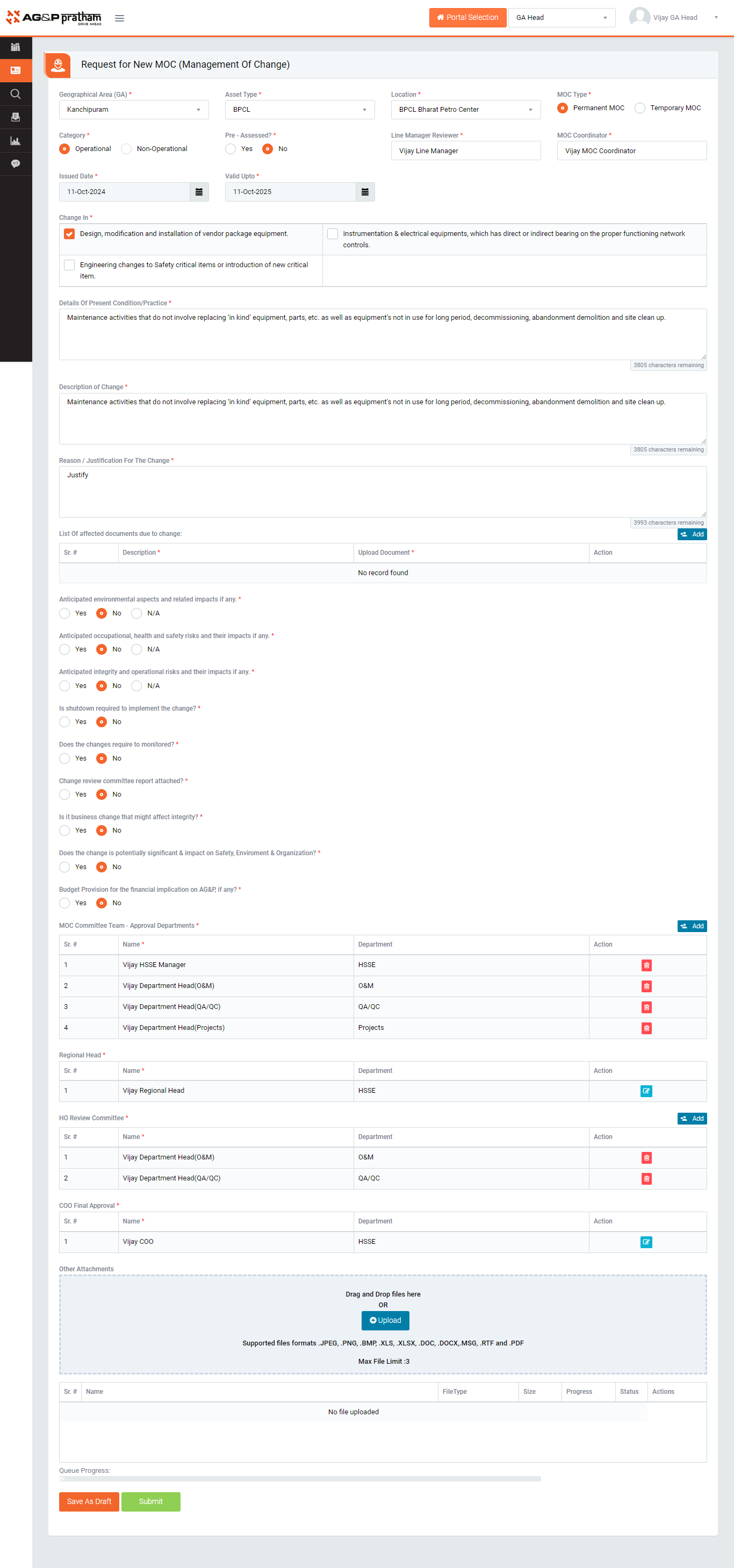
Figure 2
- Navigate to MOC Portal | Go to Request for New MOC
- Select GA, Asset type, Location, MOC Type, Category and sub category and issue date & Closure date and fill the other required details.
- Enter Line Manager and MOC Coordinator in auto complete text box, Details of present condition/practice, Description of Change, Reason / justification for the change, List of affected documents due to change and required options.
- Requester can add the reviewers in the given MOC Committee team, Regional Head, HO Review Committee team tables
- Requester can attach files by clicking on attach button
- Click Upload button to upload the attached file and click Delete button to delete the file. (There is a file size limit of 20MB for attachments and a maximum number of file attachments to be uploaded is 10. Attachment files extension would be allowed such as “.JPEG, .PNG, .BMP, .XLS, .XLSX, .DOC, .DOCX, .RTF, .PDF, .mp3, .mp4, and .m4a”)
- On submit the MOC request will be sent to selected Line Manager review.
- After Line Manager review completes the review then MOC will be sent to GA Head if the MOC raised at GA level or it will be sent to COO if MOC raised at Department level.
- Later MOC is sent to MOC Coordinator
- MOC coordinator reviews the MOC along with the Risk Assessment and sent to MOC Committee team
- After MOC Committee team review MOC sent to MOC Coordinator, Regional Head, HO Committee review respectively
- Final review will be done COO
Note :
- The fields marked with * are mandatory to be filled.
- MOC can be raised by any employee working in the plant and has access to the system.
- The requested MOC can be seen in My Action | For Your Information tab.
- In available options, if selected as yes, attachment becomes mandatory.
- Defining the role is mandatory for every reviewer, other wise concern system user will not show in the reviewers field or table.
- This type of MOC can be raised by GA level and Department level system users